CloudFront Error Cache Troubleshooting

I'm writing about a recent troubleshooting experience I had, hoping others won't have to go through the same thing.
At my company, we launched a new API server with AWS CloudFront (hereinafter CF) attached.
This API server was very simple - it returns 200 OK if there are results, and 404 if not.
After deploying the service and running final tests on the production server, an issue that didn't occur on the test server was happening on the production server due to AWS CloudFront misconfiguration.
This is the story of how I resolved that issue.
Why Doesn't Production Return Results When the Data Is in the Database?
The QA team reported that they had uploaded data, but results weren't being returned, so I looked into it.
The data was definitely in the DB... It's really there... It truly exists, but the actual server wasn't responding.
I wondered what went wrong and tested by inserting dummy data locally. The test server returned 200 OK, but only the production server was returning 404.
At this moment of massive mental breakdown, a thought suddenly occurred to me: I should try running an Invalidation.
After running the Invalidation and checking again, surprisingly, the results were coming back normally.
How AWS CloudFront Caches
Initially, I unconsciously assumed the cache strategy would only cache results for 100-3xx (HTTP success).
However, the issue started because it worked differently from what I thought.
Basically, Amazon caches all responses from the Origin server.
This means that 400-5xx (errors or failures) are also cached.
As I mentioned above, the API server I created initially returns 404 results, but changes to 200 when data comes in.
Naturally, since CloudFront caches the 404 from the first request, the result remains cached as 404 until the MAX TTL time passes.
How to Change Error Status Code Cache Strategy in AWS CloudFront
To resolve this issue, I searched on Google and found that many people were struggling with similar issues.
Now let me summarize how to solve this problem. First, go to CF settings.

Then select the "Error Pages" tab at the top and click Create Custom Error Response.
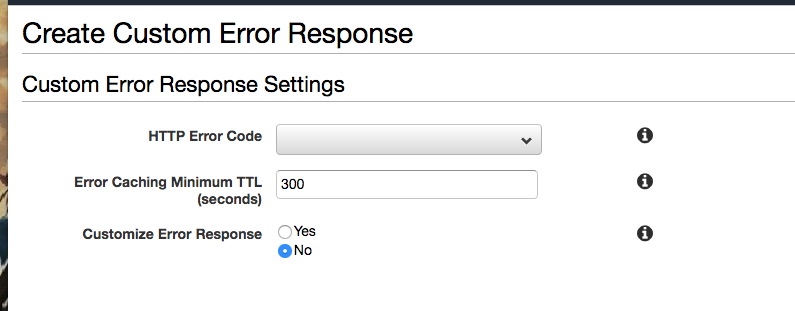
You can then specify the Error Status Code to change the policy for and the Cache TTL.
This resolves the problem of caching errors.
Conclusion
This was actually a very confusing issue at first. The results existed in the database, but the message said there were no results.
However, if I had looked into CF a little more deeply when initially designing the server architecture, this issue wouldn't have occurred. I think this is something I need to be more careful about in the future.
Anyway, I hope that anyone experiencing the same issue as me can clearly resolve it after reading this article. With that, I'll conclude.