Let's Learn About Aurora Serverless


I was using Amazon Aurora as the main storage for a certain project.
One day, while browsing through related documentation as usual, I came across this article.
[
Amazon Aurora Serverless General Availability | Amazon Web Services Amazon Aurora combines the performance and availability of high-end commercial databases with the simplicity and cost-effectiveness of open source databases, and is a MySQL and PostgreSQL compatible database service built for the cloud. Aurora Serverless, a new feature of Aurora, was announced at AWS re:Invent last year. Today, we are pleased to announce the general availability of Aurora Serverless for MySQL. aws.amazon.com
](https://aws.amazon.com/ko/blogs/korea/aurora-serverless-ga/) Today, I want to talk about Amazon Aurora Serverless.
What is Amazon Aurora Serverless?
Basically, you can think of Aurora Serverless as having the same concept as 'Lambda'. (Well, that's obvious..)
For traffic that comes in like a rocket, Aurora Serverless will manage and operate the load on the DB, so you just pay for what you use.
Amazon explains why Aurora Serverless is needed like this:
Examples include retail websites with intermittent sales events, reporting databases that generate reports when needed, development and test environments, and new applications with uncertain demand. In these and many other cases, it can be difficult to configure exactly the right capacity at exactly the right time. Also, paying for unused capacity can unnecessarily increase costs.
Aurora Serverless is Auto Scaling, but won't connections get cut off and cause chaos?
Then you might wonder:
"Wait, this is totally like EC2 Auto Scaling. Won't connections get cut off in the middle, requiring Application modifications?"
To answer first: "No, you don't need to modify the Application, and connections won't be cut off."
This is what "Aurora Serverless" claims as its advantage.
If you're a typical developer, you might think "Wow, Amazon is amazing," but I thought "Wait, how did they implement that?"
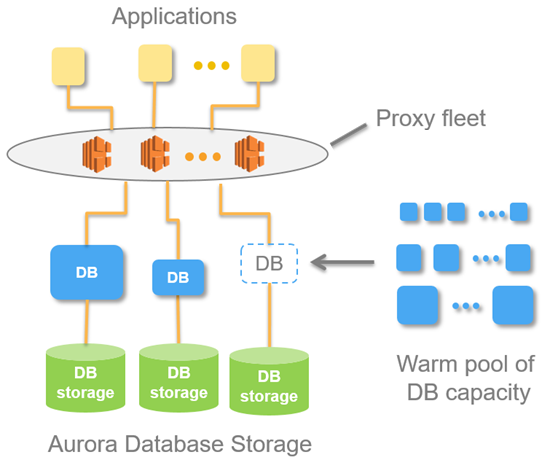
Aurora Serverless Architecture
At the center of this magical method is "Proxy fleet".
Basically, applications don't connect directly to the DB server but maintain connections with servers in the Proxy Layer.
This allows Aurora Serverless to perform flexible Auto Scaling of DB instances.
How does Amazon Aurora Serverless Auto Scale work?
The capacity allocated to an Aurora Serverless DB cluster scales up and down smoothly based on the load generated by client applications (CPU utilization and number of connections). (Similar to the concept of EC2 Auto Scale)
Like Amazon Auto Scaling, you specify minimum and maximum capacity.
The unit for this is specified in ACU (Aurora Capacity Units).
Amazon basically operates a Warm Pool for Aurora Serverless in each Region.
Through this, when Aurora Serverless determines that the current computing power is insufficient, it switches to an instance with better resources from the Warm Pool, and the "Proxy Fleet" transfers existing connections to the new instance, allowing you to handle rocket-like DB Events quickly without modifying the application.
However, there's no magic in this world, and databases are important.
Auto Scale Events are temporarily suspended in the following situations:
-
When a long-running query or transaction is in progress
-
When temporary tables or table locks are in use
Pause and Resume When Not in Use - Possible with Amazon Aurora Serverless
A characteristic of Aurora Serverless is the flexible instance utilization that keeps being mentioned.
During times with few or no events (when there are no connections for 5 minutes or less), capacity is set to 0,
and during times when events are overflowing, it automatically scales up as needed. At a certain level, you can save costs,
provide high service quality - how great is that?
The default pause time for Aurora Serverless is a minimum of 5 minutes to a maximum of 1440 minutes, with a default of 5 minutes.
Of course, you can choose not to use the pause feature.
When paused, you don't pay for computing resources (CPU, Memory), only storage usage costs are measured.
Let's Think About Amazon Aurora Serverless Use Cases
Just talking about it might not resonate, so let me give some examples.
(1) I need to use daily batch processing.
I'm running a shopping mall service, and I need to use 10 CPUs for about 30 minutes once a day for daily settlement.
However, during actual service operation, I only use 2 CPUs.
So Developer Y made it so that once a day, when starting the job through AWS API, the server tier is raised and lowered.
But all of this becomes a management point and requires development.
However, if you use serverless and just set the maximum ACU,
developers don't have to worry about infrastructure logic and can just focus on developing the Application.
(2) Our service spikes at specific times.
These days, because of "COVID-19," there are many related services, and requests often spike irregularly.
So, because service interruption cannot happen, I've already upgraded to a large instance in advance,
but actual usage is less than 10%, yet I have to pay for all of it. How unfair is that?
However, if you use Serverless, when specific events occur, the scale adjusts in a short time to improve service quality, and you only pay for what you use.
Amazon Aurora Serverless Limitations
As I keep saying, there's no magic in this world, and databases are important, so there are the following limitations:
- You cannot assign a PUBLIC IP.
You cannot assign a PUBLIC IP to the Aurora DB itself.
- You cannot specify parameters per DB instance, only cluster parameters can be applied.
(Actions like adjusting specific values on READ instances are not possible.)
- Multi AZ is not supported.
The DB cluster is created in a specific Zone.
This means that when a failure occurs in that Zone, it will automatically failover to another Zone,
but that takes a long time and causes service interruption issues.
However, because Aurora's architecture separates storage and computing, data can be used without problems.
- Aurora MySQL Cluster has the following parameter limitations:
character_set_server. collation_server. general_log. innodb_file_format. innodb_file_per_table. innodb_large_prefix. innodb_lock_wait_timeout. innodb_monitor_disable. innodb_monitor_enable. innodb_monitor_reset. innodb_monitor_reset_all. innodb_print_all_deadlocks. lc_time_names. log_output. log_queries_not_using_indexes log_warnings long_query_time lower_case_table_names net_read_timeout net_retry_count net_write_timeout server_audit_logging server_audit_events server_audit_excl_users server_audit_incl_users slow_query_log sql_mode time_zone tx_isolation
Only these values can be modified, and everything else can only be used with default values.
Conclusion
We always stand at a crossroads between service quality and cost.
If you predict events well and use resources efficiently, there's no problem.
However, if you made predictions to respond to specific events but the predictions were wrong, you've used expensive resources but didn't get your money's worth.
Amazon launched Aurora Serverless to meet these needs,
allowing Application developers to develop without worrying about infrastructure, and providing great benefits in terms of operations and using costs appropriately.
Also, for services that only have requests at specific times or have few requests, if you've configured with Lambda + API Gateway for efficient operation,
and if there are RDBMS requirements, I recommend using Aurora Serverless to reduce costs rather than flexing to Aurora.